Bank, GST and TDS reconciliation for Tally, done in minutes.
The jobs every accountant does every month, in one app. Post a whole bank statement to Tally in one click, tie your books out with GSTR-1, 3B, 2B and 2A down to the last invoice, match Form 26AS / Form 168 with your TDS ledger, and enter sales, purchases, depreciation and delivery challans without typing - with Tally on your PC, on your office network or on cloud.
Bank statement to Tally, in one click
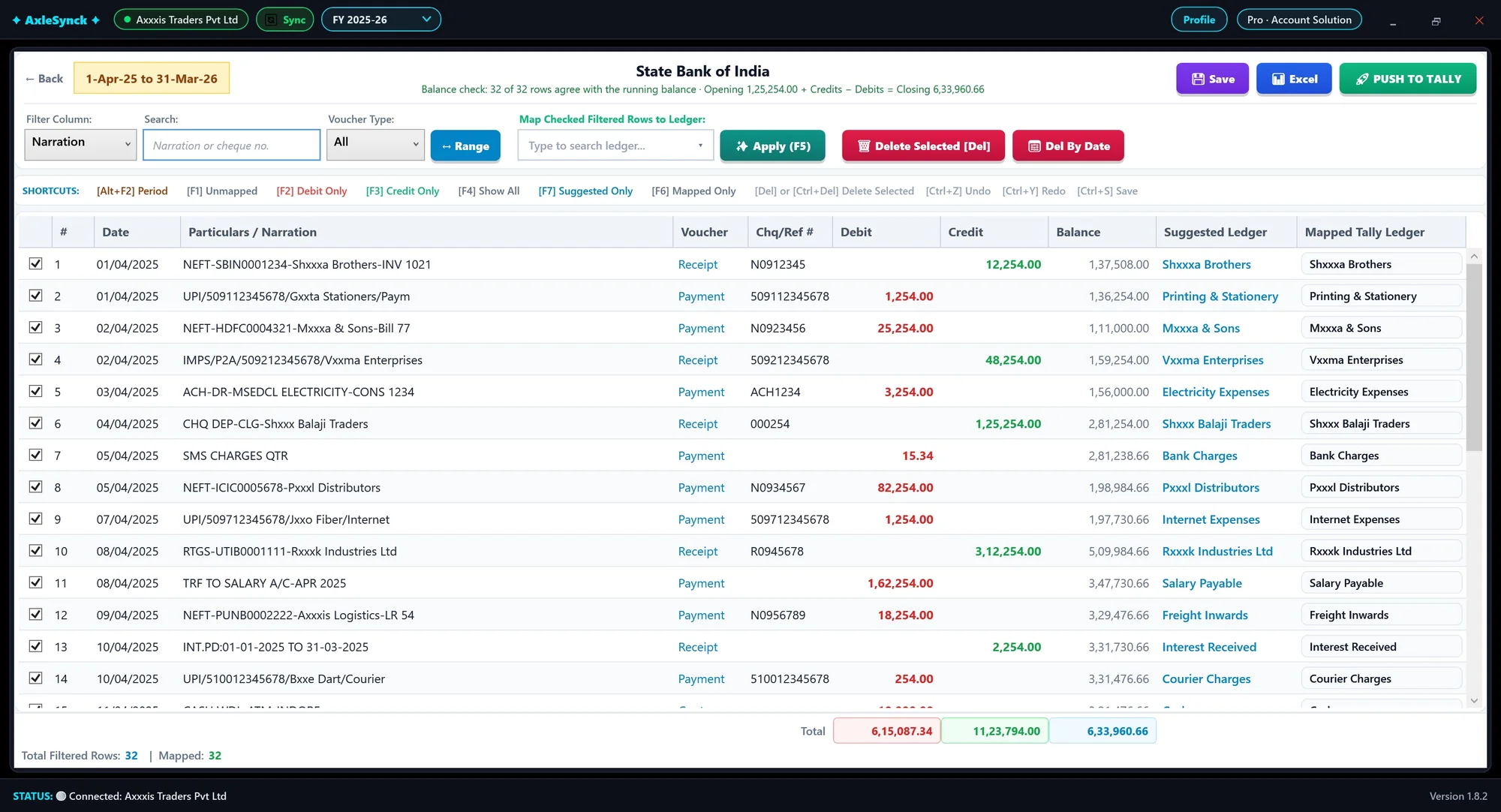
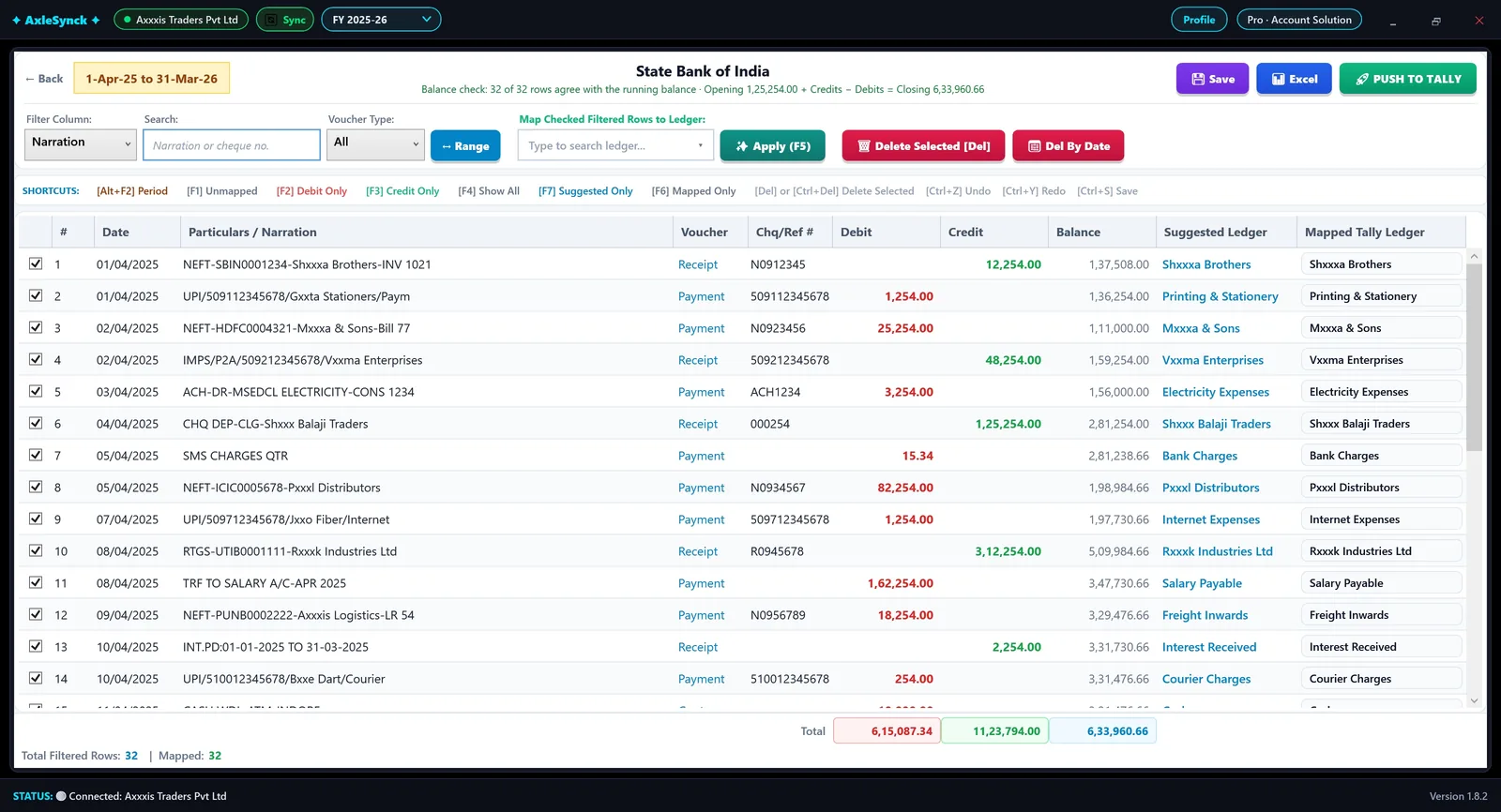
PDF, Excel or CSV from any bank, every row checked against the running balance, ledgers suggested. See how it works →
bank templates to set up: any bank is read as printed
returns reconciled: GSTR-1, 3B, 2B, 2A, 26AS
modules in one app
click to post to Tally
A month of Tally work, in four steps
Read it, check it, reconcile it, post it. AxleSynck does the typing; you make the decisions.
-
Read
Drop a bank statement - PDF, Excel or a scan - or fetch your books from Tally and your returns from the GST portal. Any bank is read as printed.
-
Check
Every row is checked against the running balance before anything reaches Tally, and ledgers are suggested from your past entries.
-
Reconcile
Your books against GSTR-1, 3B, 2B and 2A bill by bill, and Form 26AS / Form 168 party by party, with the reason for every difference.
-
Post
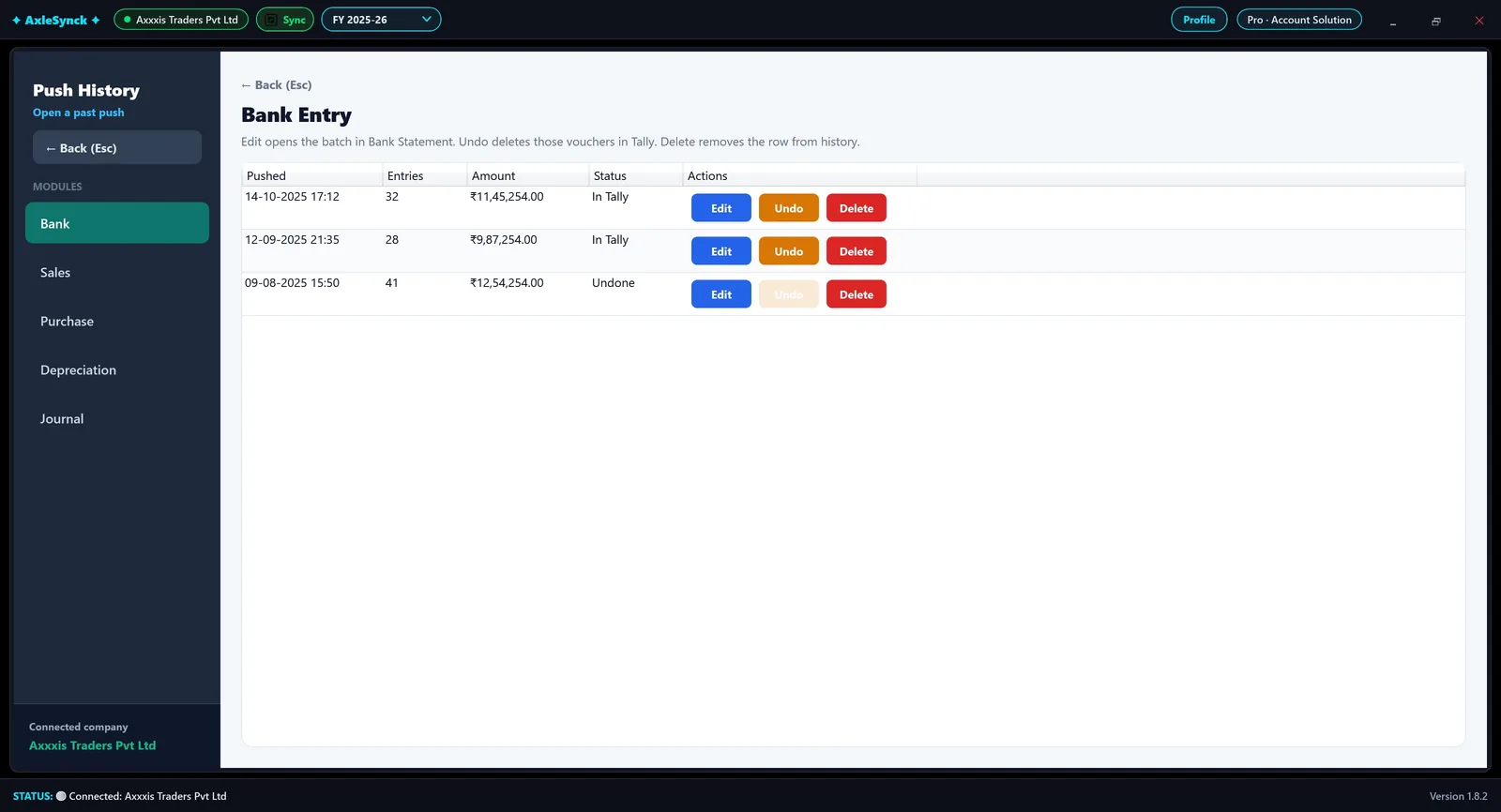
Push to Tally in one click. Every push is kept in history, with undo.
What is AxleSynck?
AxleSynck is Windows software that automates bank, GST and TDS reconciliation for Tally. It posts a bank statement from any bank to Tally in one click, matches your books with GSTR-1, GSTR-3B, GSTR-2B and GSTR-2A bill by bill, and matches Form 26AS and Form 168 with your TDS ledger party by party. It also handles sales and purchase entry, depreciation, delivery challans and ledger matching.
Built in Indore for Indian accountants, CA firms and businesses that keep their books in Tally. Your accounting data stays on your own computer; only the features you use - GST portal sync, licence activation and enquiries - send data outside.
Updated 9 November 2026 · More questions · Step-by-step tutorials
Key facts
- Product
- AxleSynck by Account Solution
- Works with
- Tally on Windows 10 / 11
- Price
- ₹2,999 Standard / ₹7,499 Pro per year (launch prices); ₹7,000 Pro when code AXLESYNCK499 is applied at checkout
- Free trial
- 1 day, all modules, started inside the app
- Data
- Stored on your PC, not on our servers
- Support
- support@axlesynck.in and WhatsApp
- Made in
- Indore, Madhya Pradesh, India
Bank. GST. TDS. Reconciled, done right.
The jobs that take the most time every month - and the ones AxleSynck was built for.
Bank statement to Tally, with every row proved
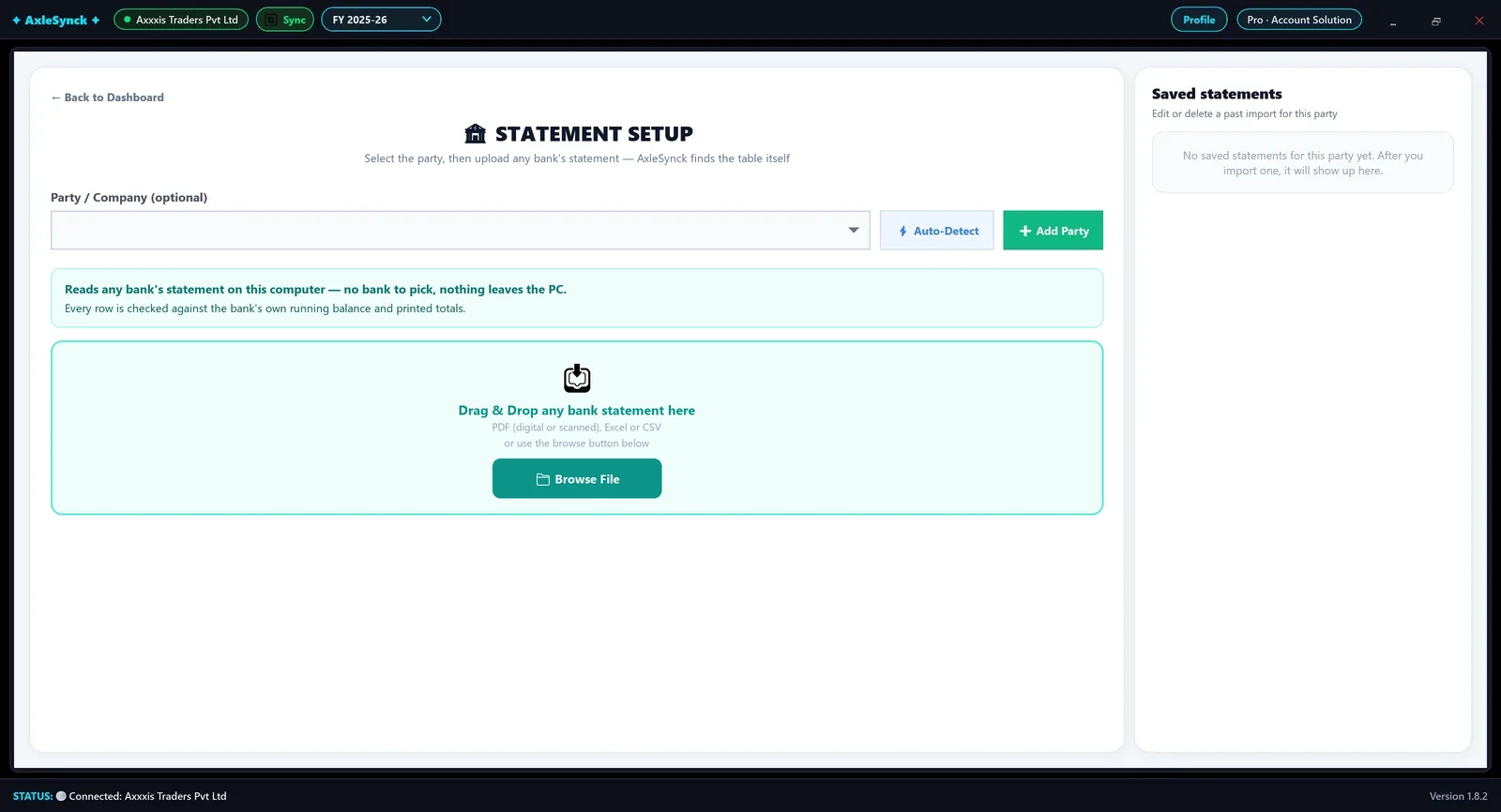
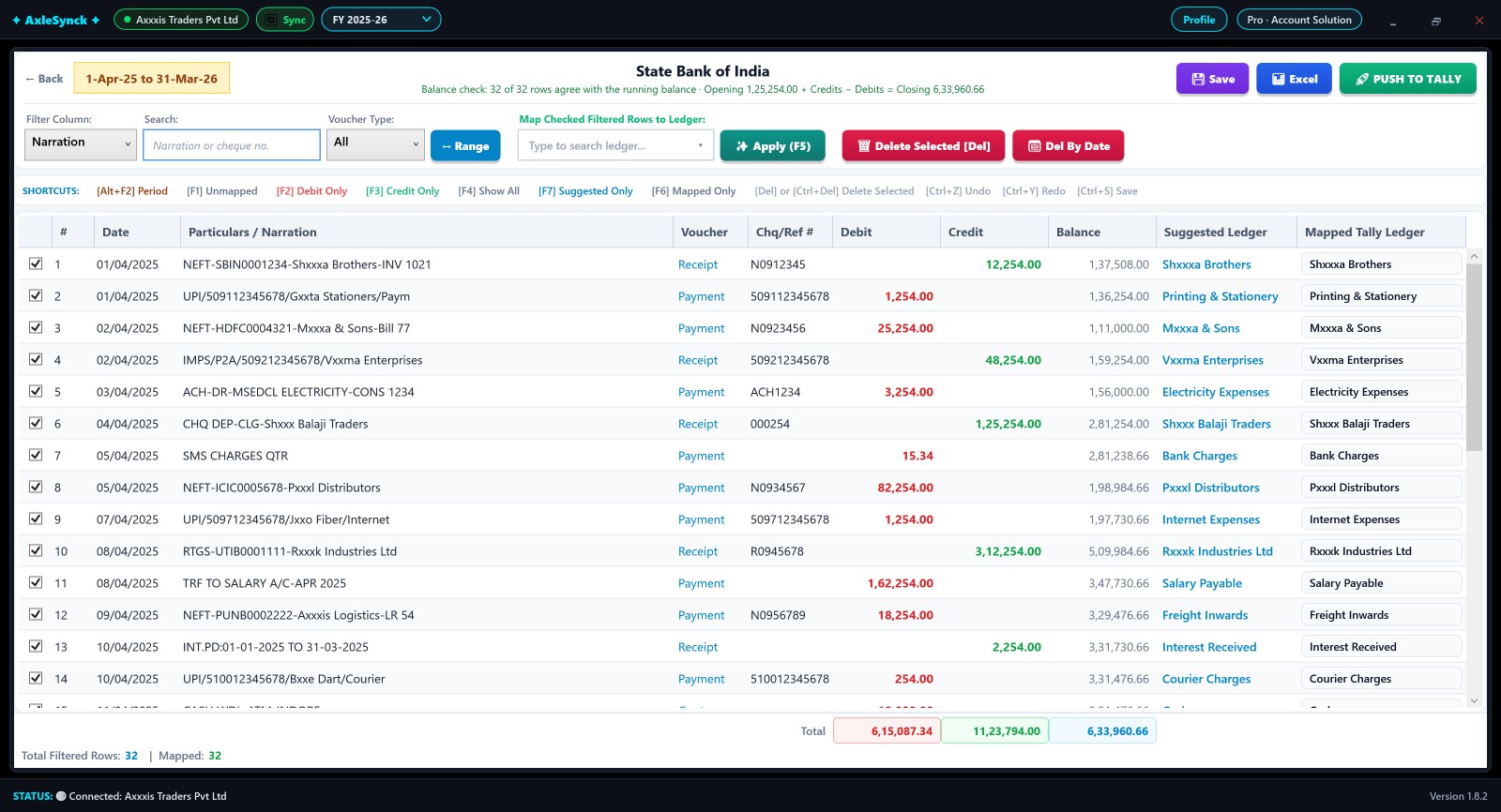
A PDF, Excel or CSV statement from any bank - SBI, HDFC, ICICI, Axis, Kotak, Bank of Baroda or any other - is read as printed, with no bank to pick and no template to build. It is read on your own PC, and many scanned PDFs are read too. Every line is checked against the running balance before anything reaches Tally.
- Balance-checked: opening + credits − debits = closing, row by row
- Ledgers suggested from your past entries; map hundreds of rows at once
- Push to Tally in one click, with history and undo
- Filters, shortcuts and Excel export, the way Tally users work
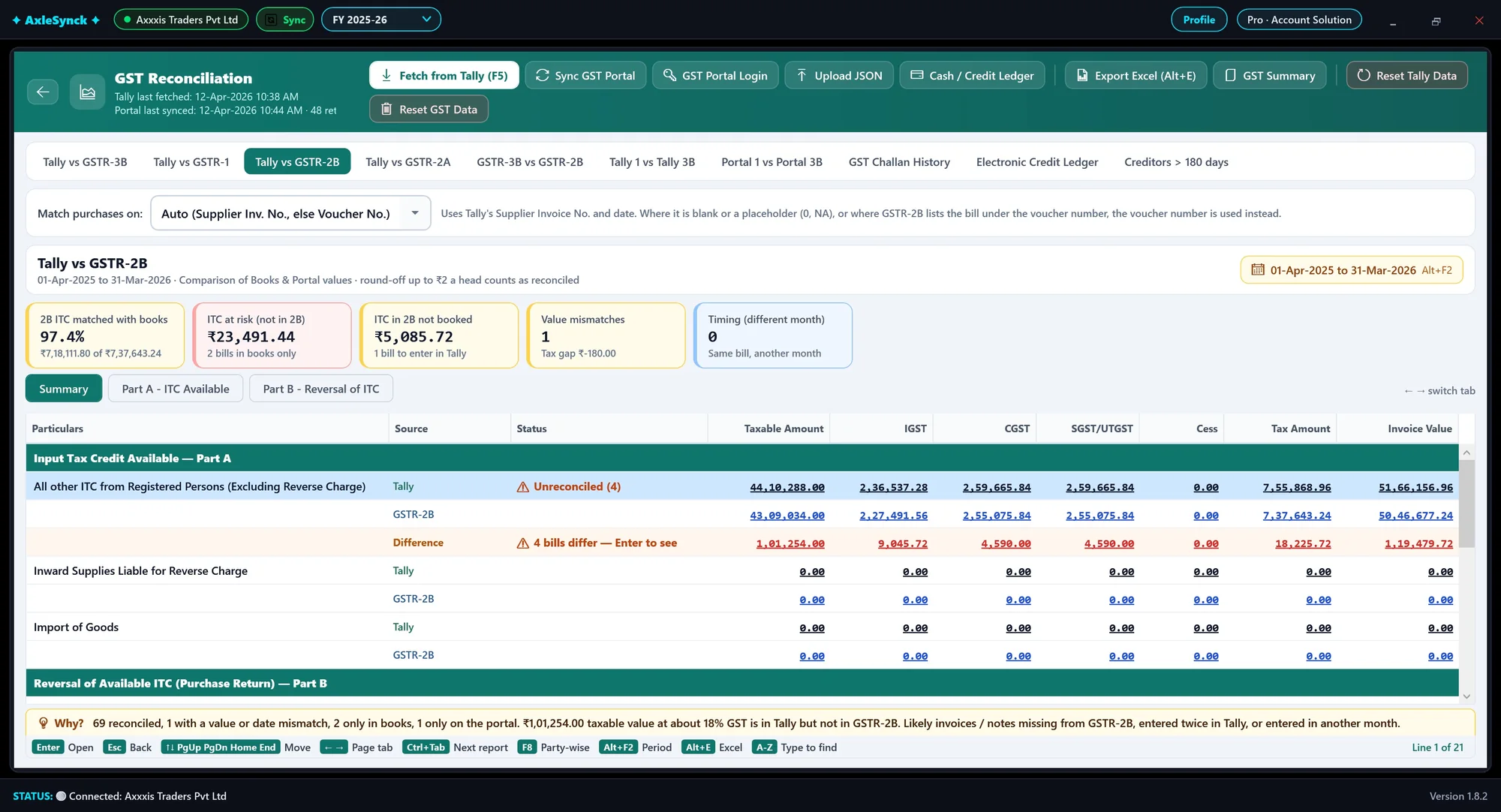
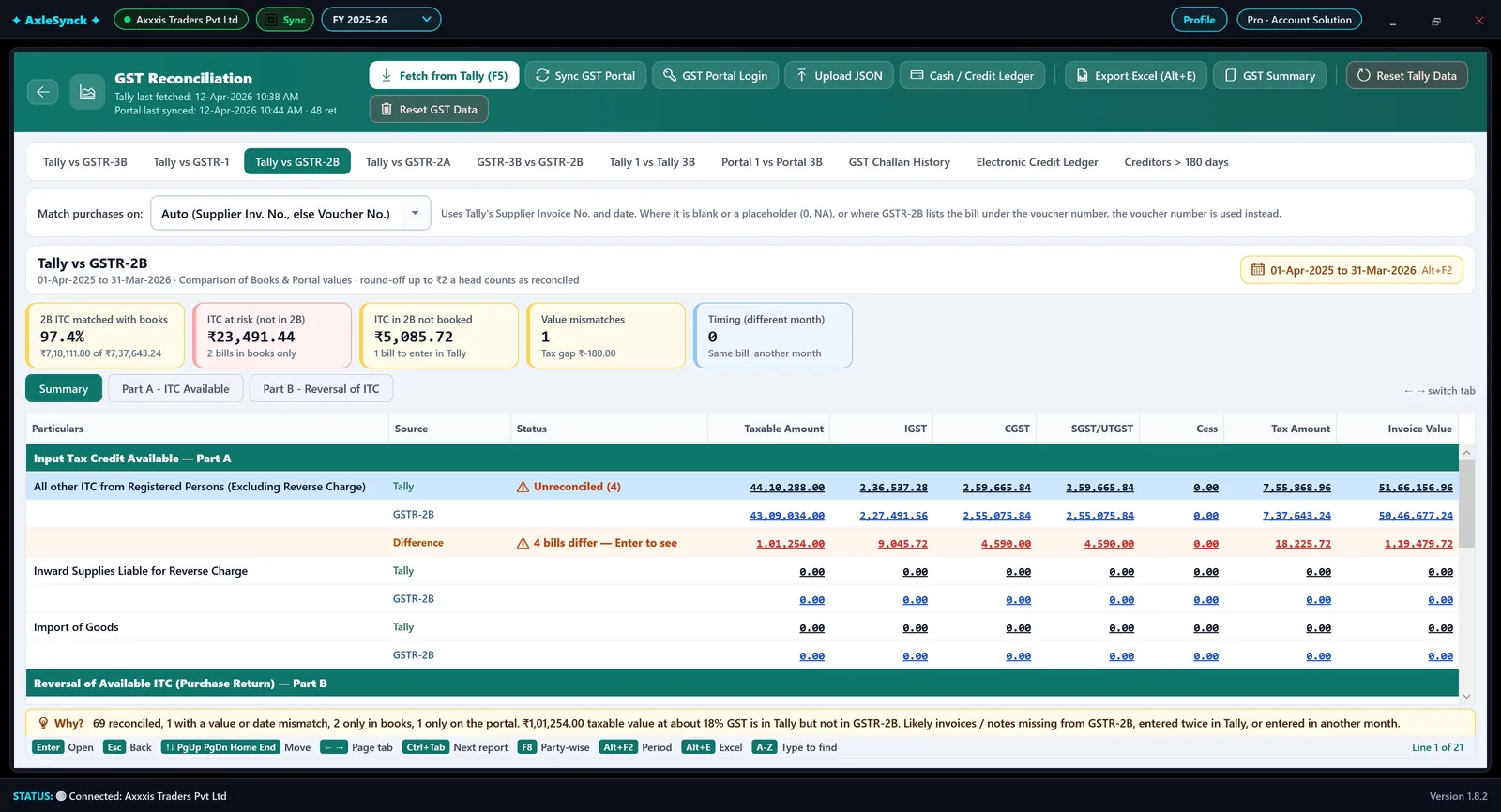
Your books against GSTR-1, 3B, 2B and 2A, down to the bill
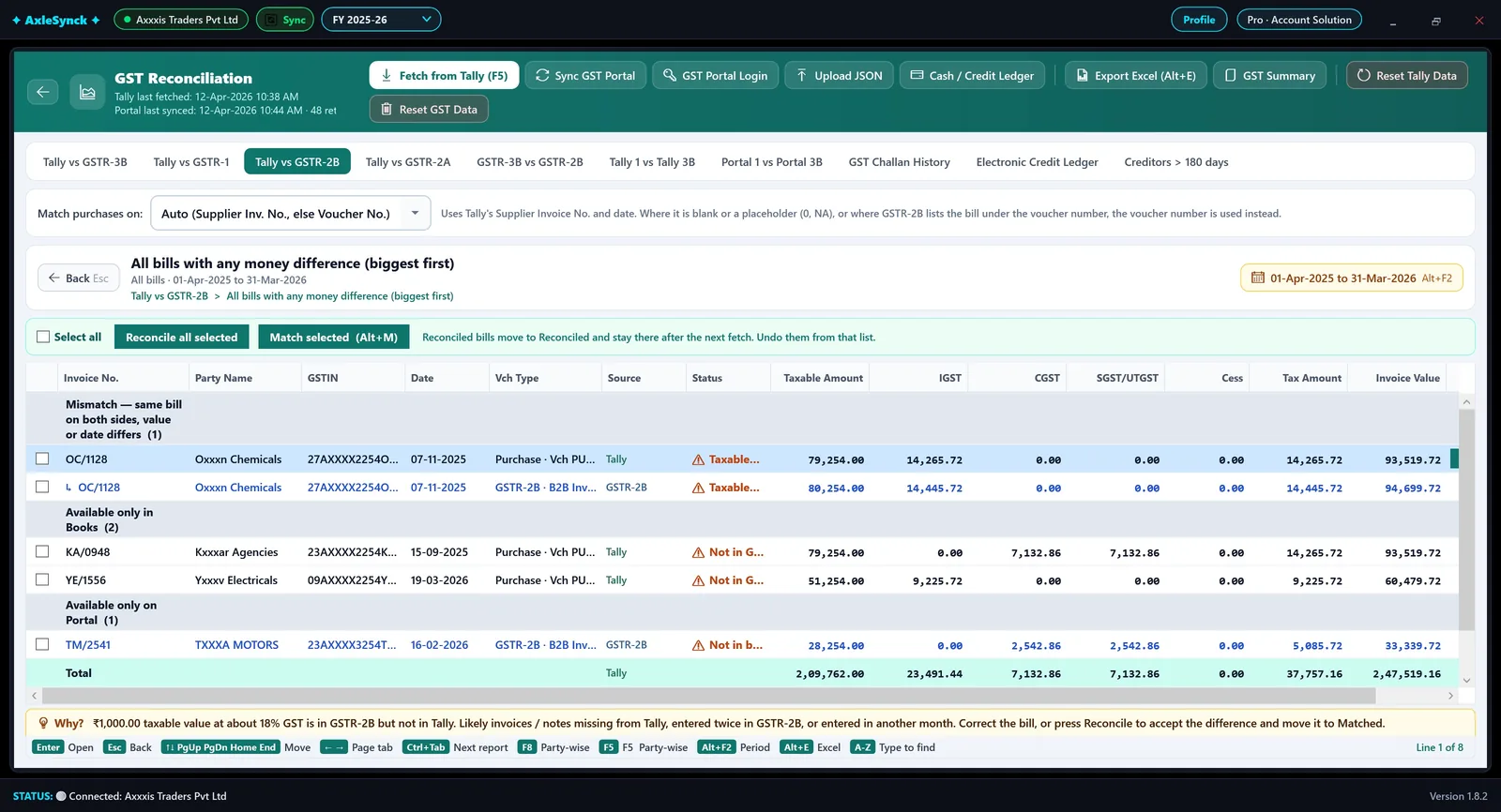
Fetch from Tally, sync the GST portal, and see every head and every bill side by side - Tally, portal and the difference, with the reason why.
- GSTR-3B: outward, 3.2, reverse charge, ITC 4A(1)-(5) and inward supplies
- GSTR-1: B2B, B2C, notes, exports, nil / exempt, HSN and documents - amendments inside each
- GSTR-2B / 2A: bill-by-bill matching, ITC at risk, imports on Bill of Entry, reconcile with a tick
- GST portal sync, cash and credit ledger, GST summary in Excel
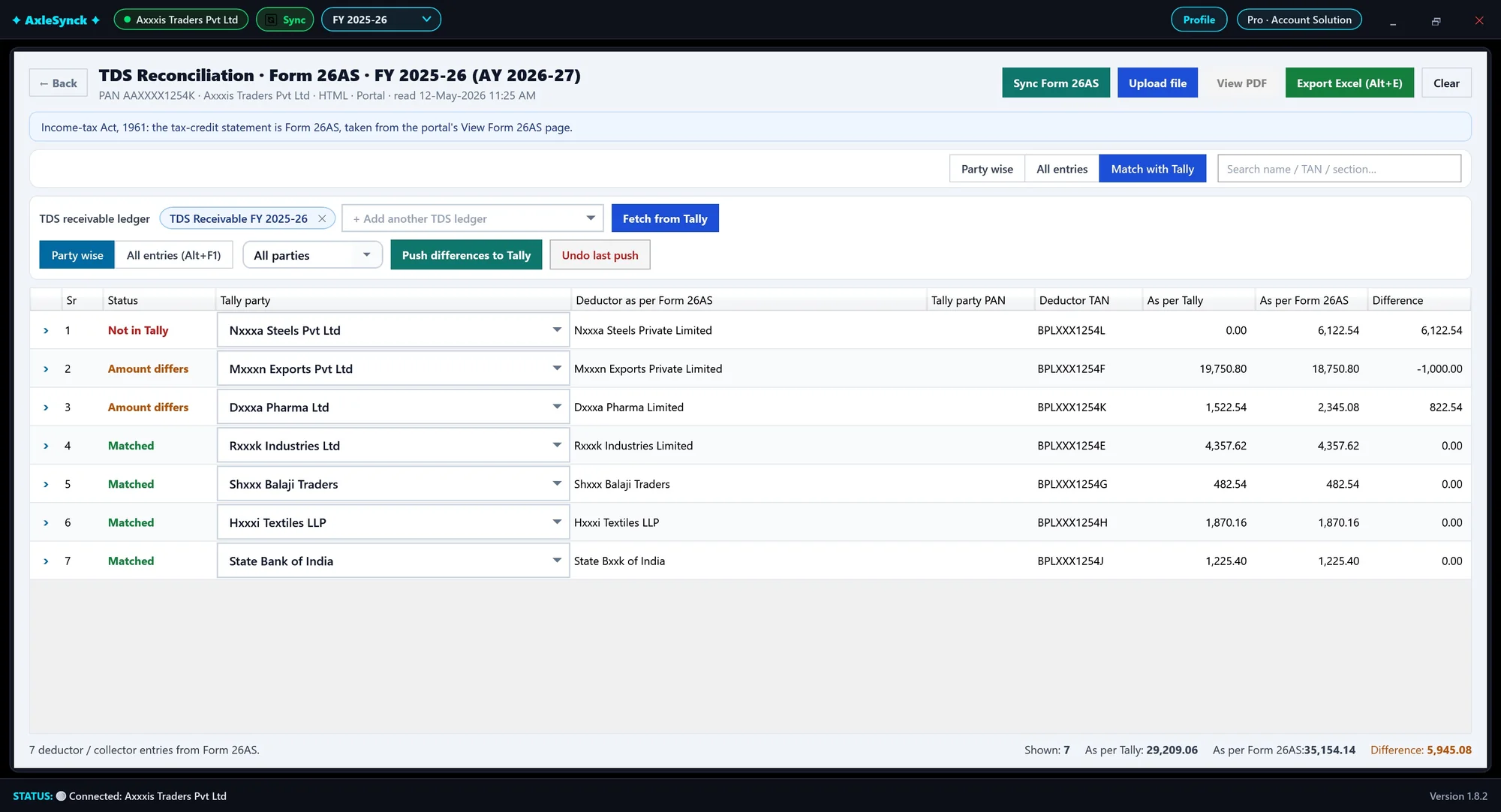
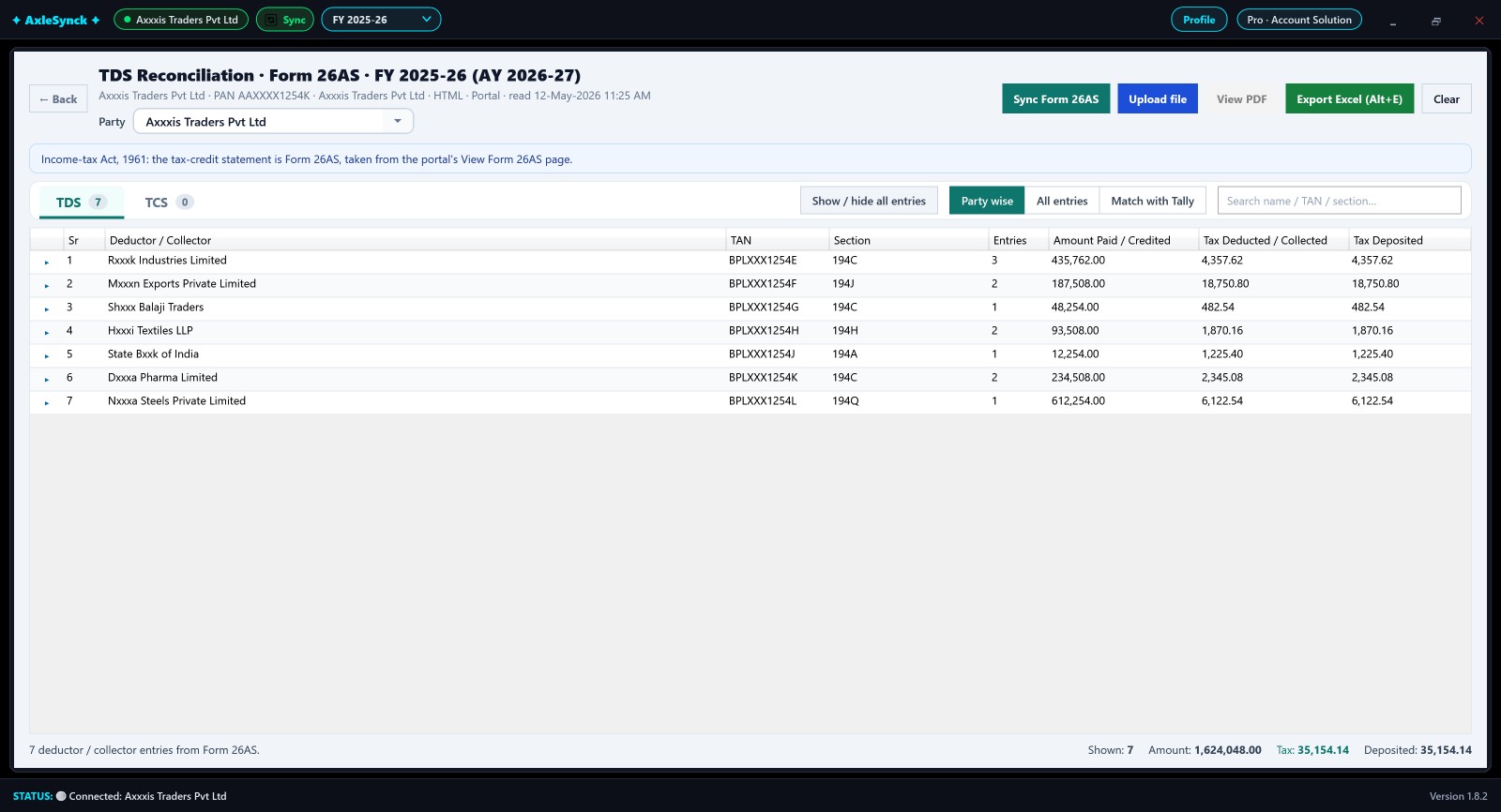
Form 26AS and Form 168 against your TDS ledger, party by party
AxleSynck signs in to the Income Tax portal for you and brings the statement - Form 168 from tax year 2026-27, Form 26AS for the years before - then sets it against the TDS receivable ledger in Tally and shows what is short or missing.
- One-click sync from the Income Tax portal, with the statement's own PDF kept
- Party wise, all entries and a Section filter (194C, 194J, 194Q ...)
- Match with Tally party by party, with every difference shown
- Post the differences to Tally as journals, export everything to Excel
A look inside AxleSynck
The screens you will use every month. Pick one, or let them play.
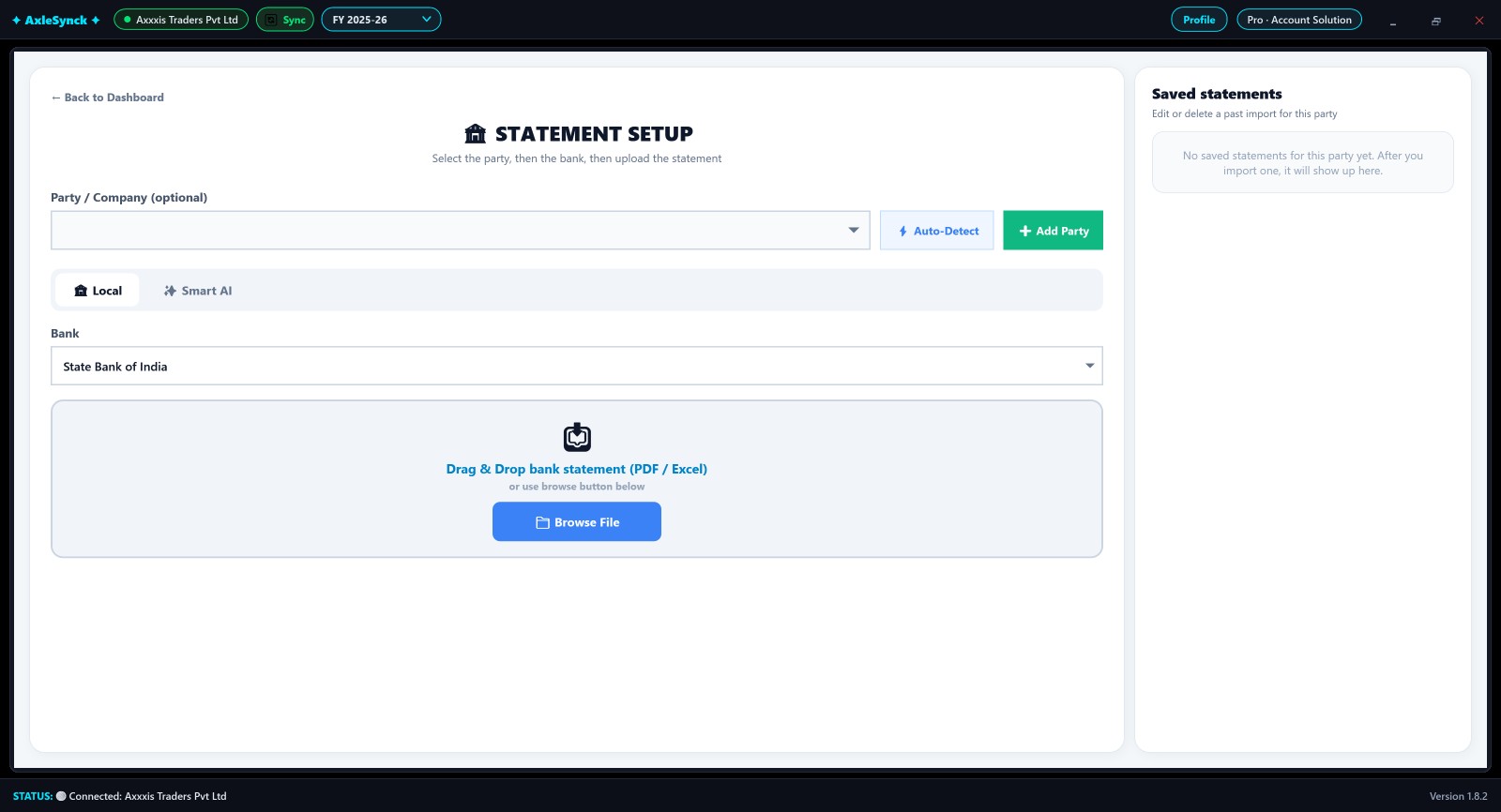
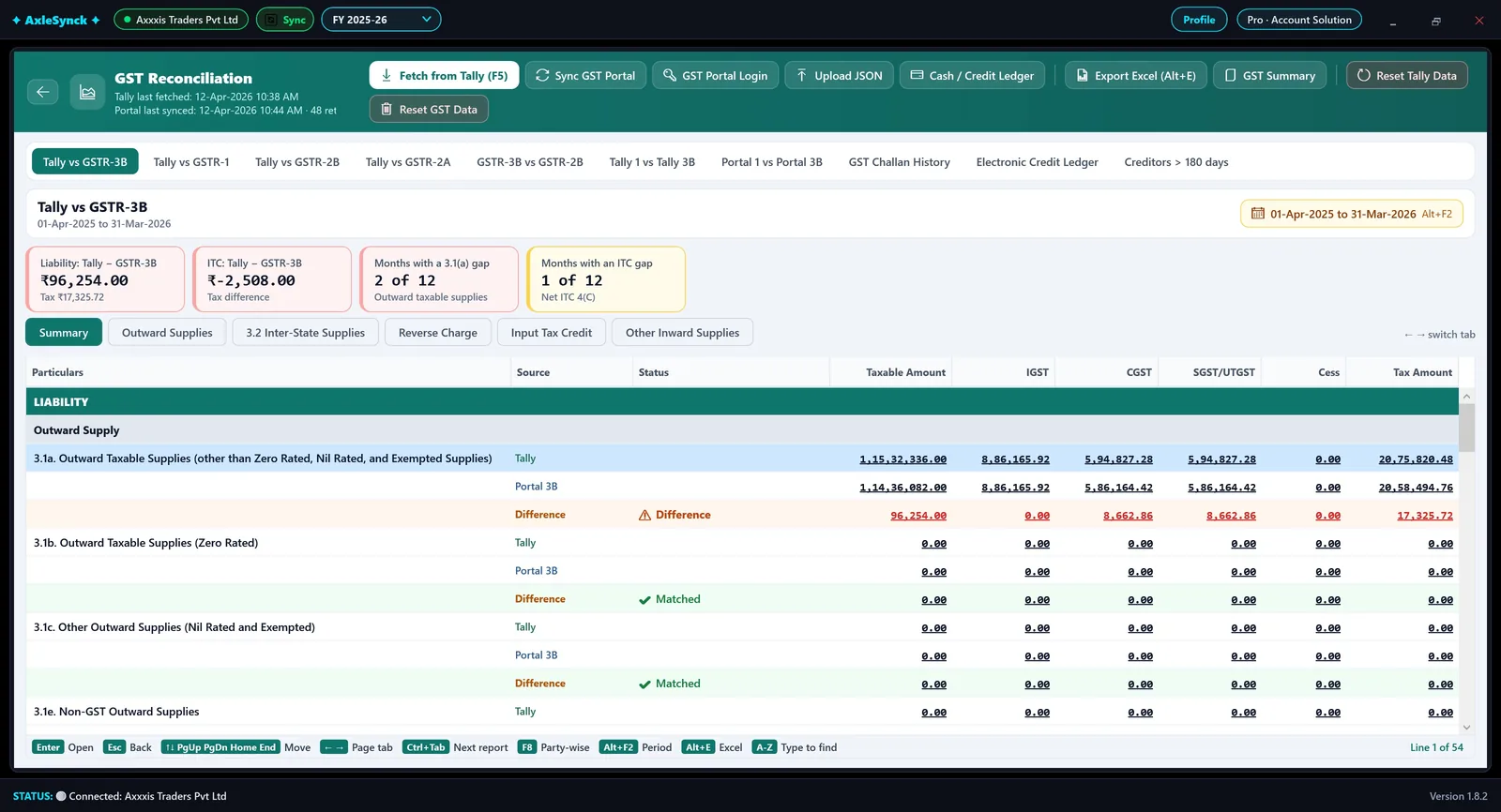
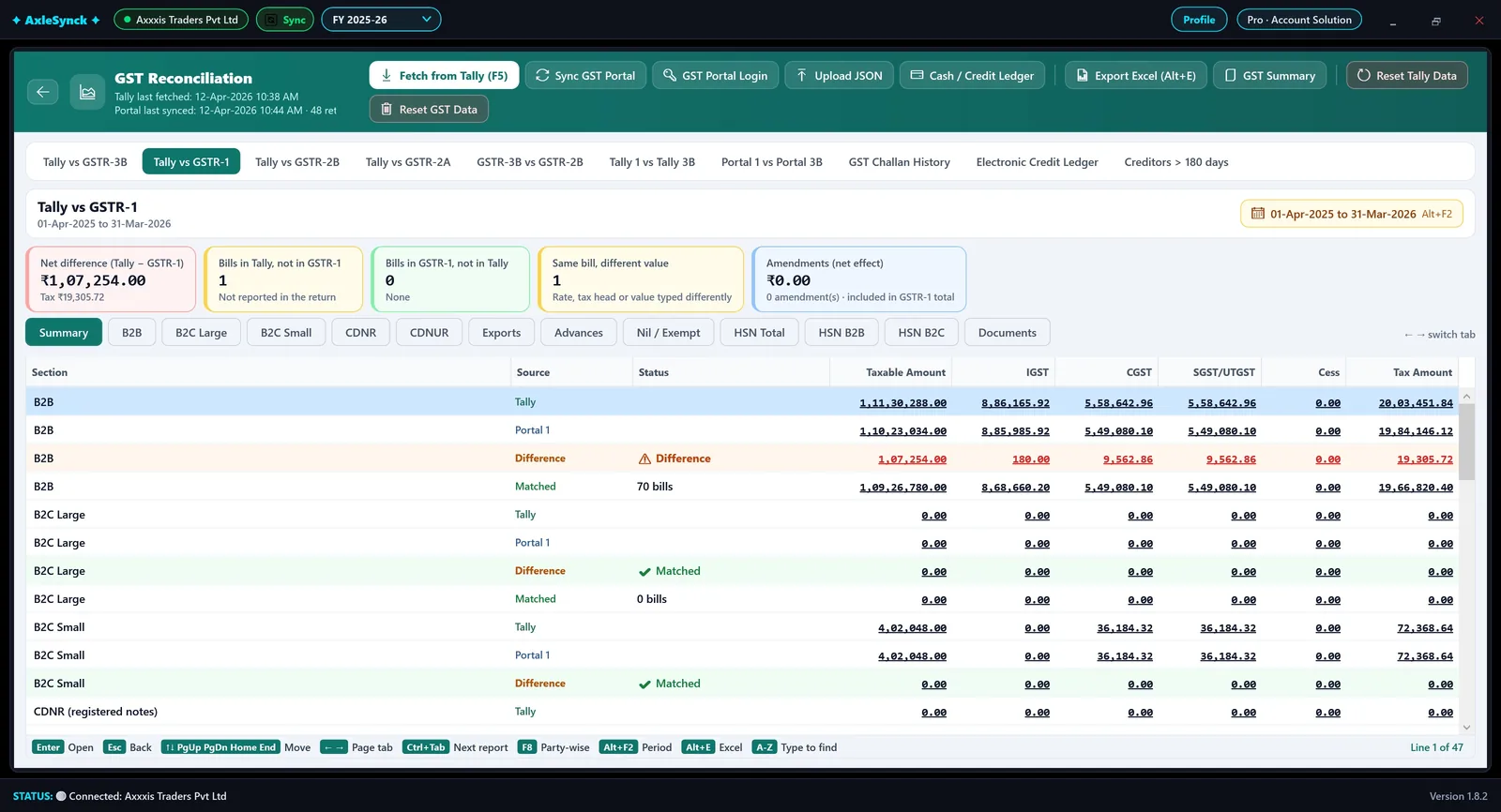
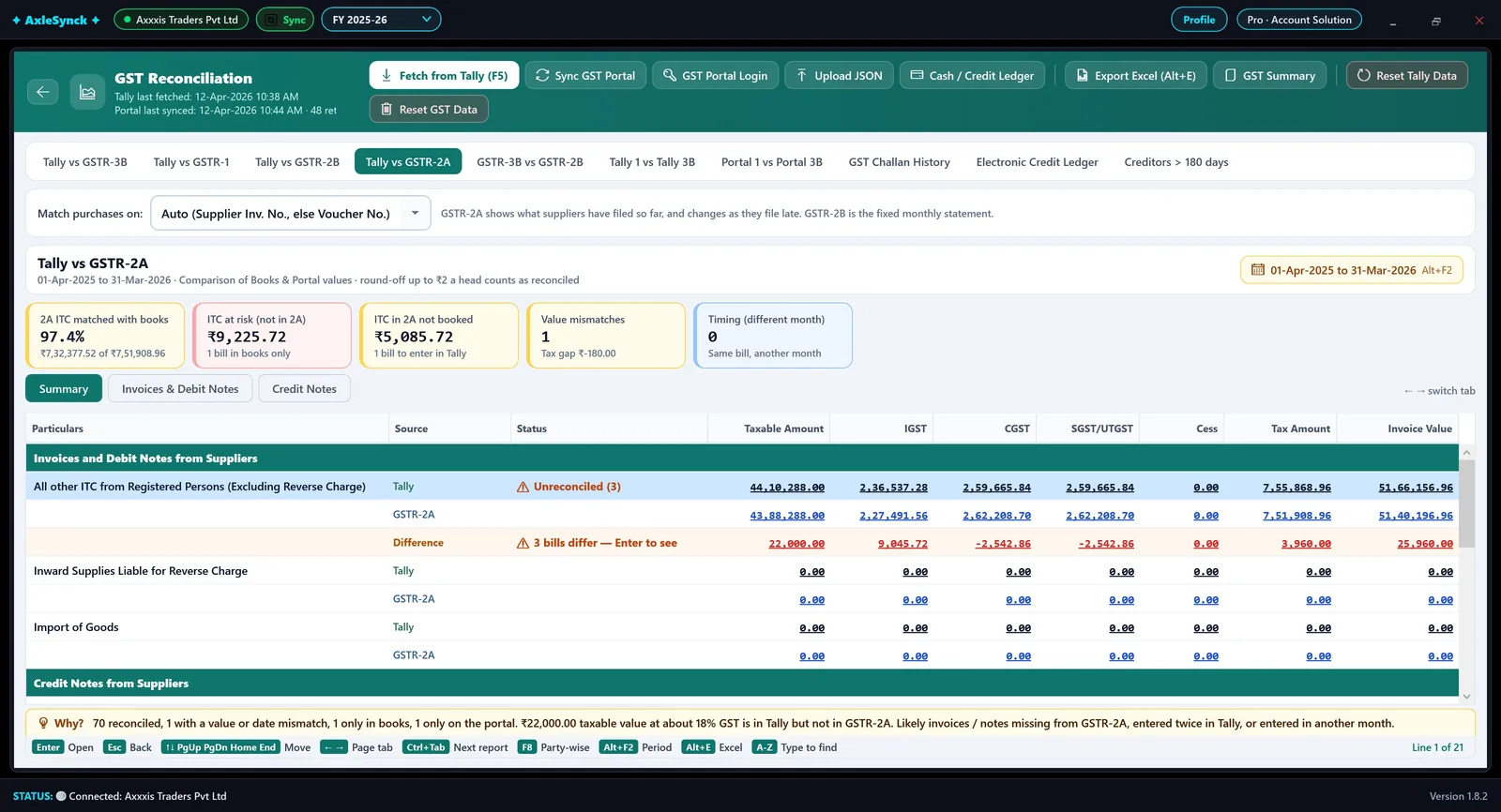
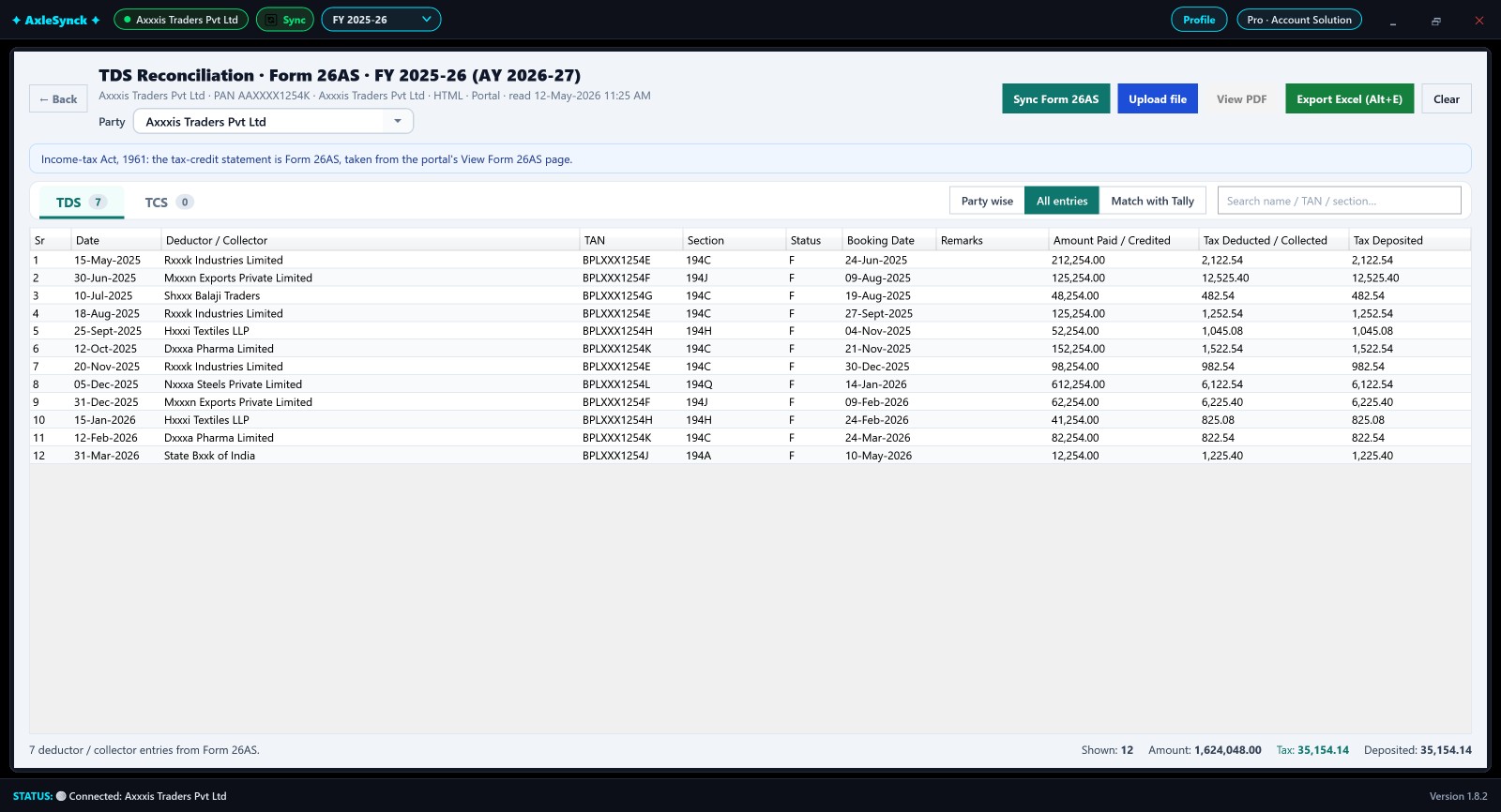
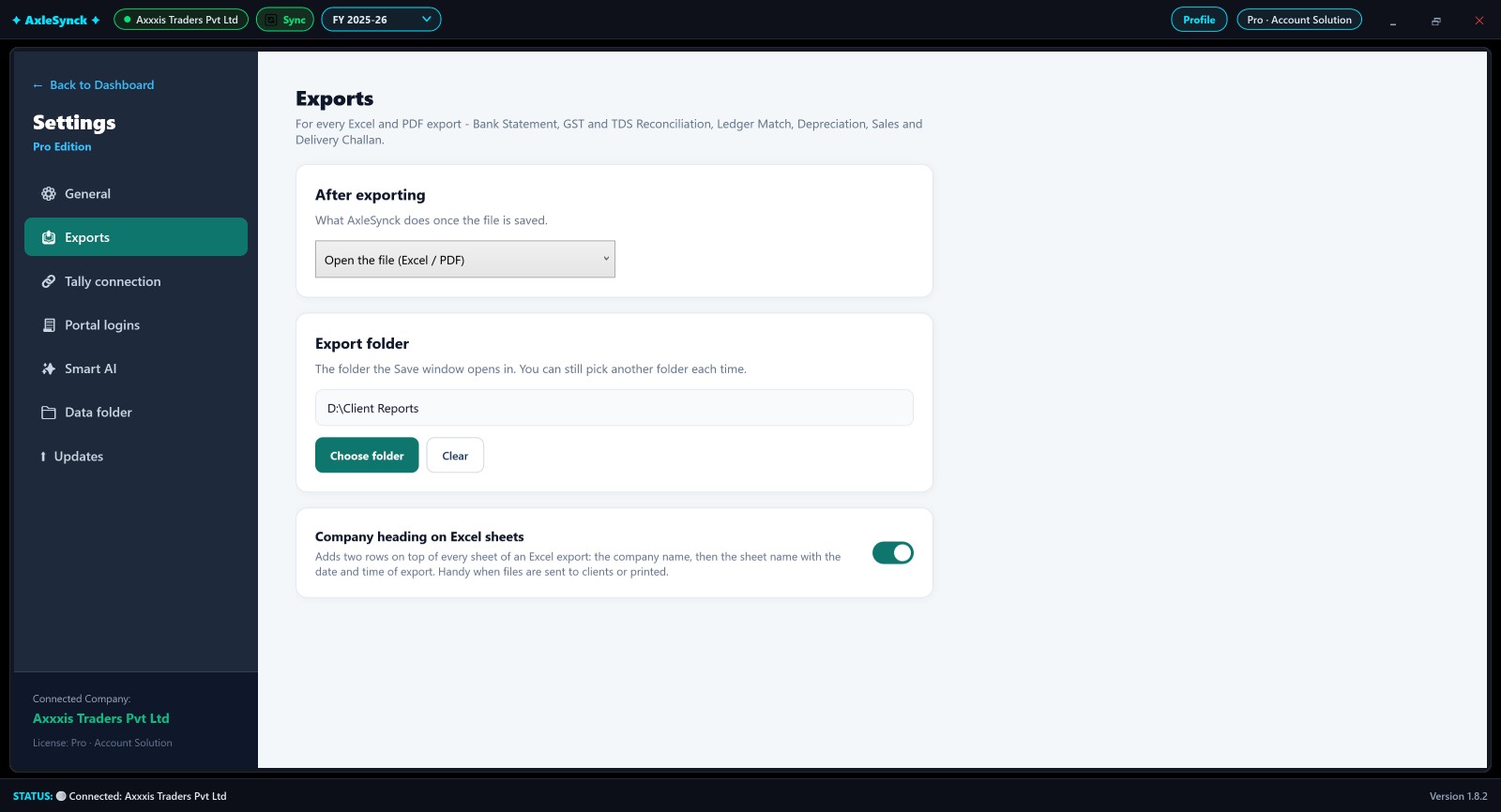
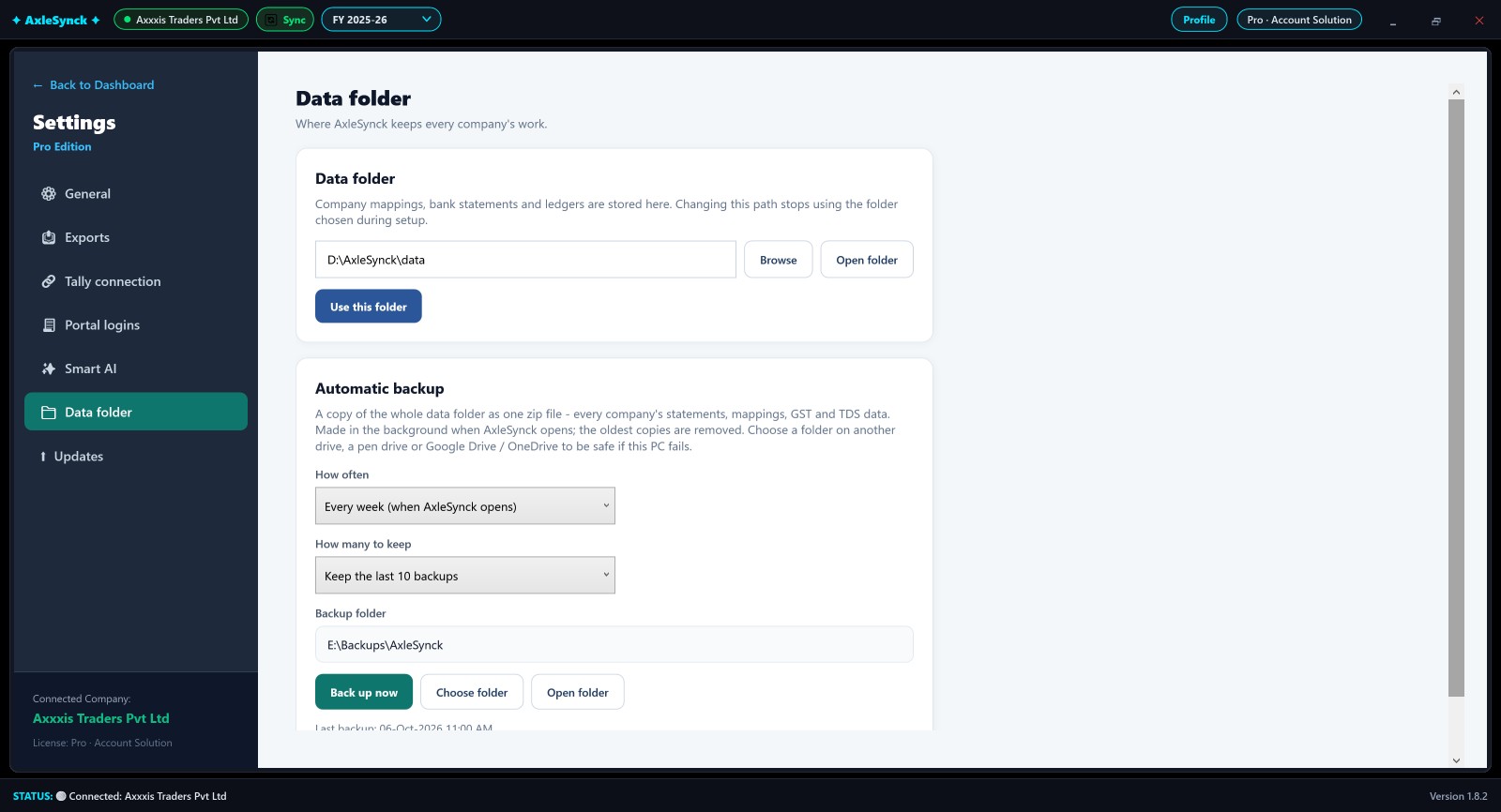
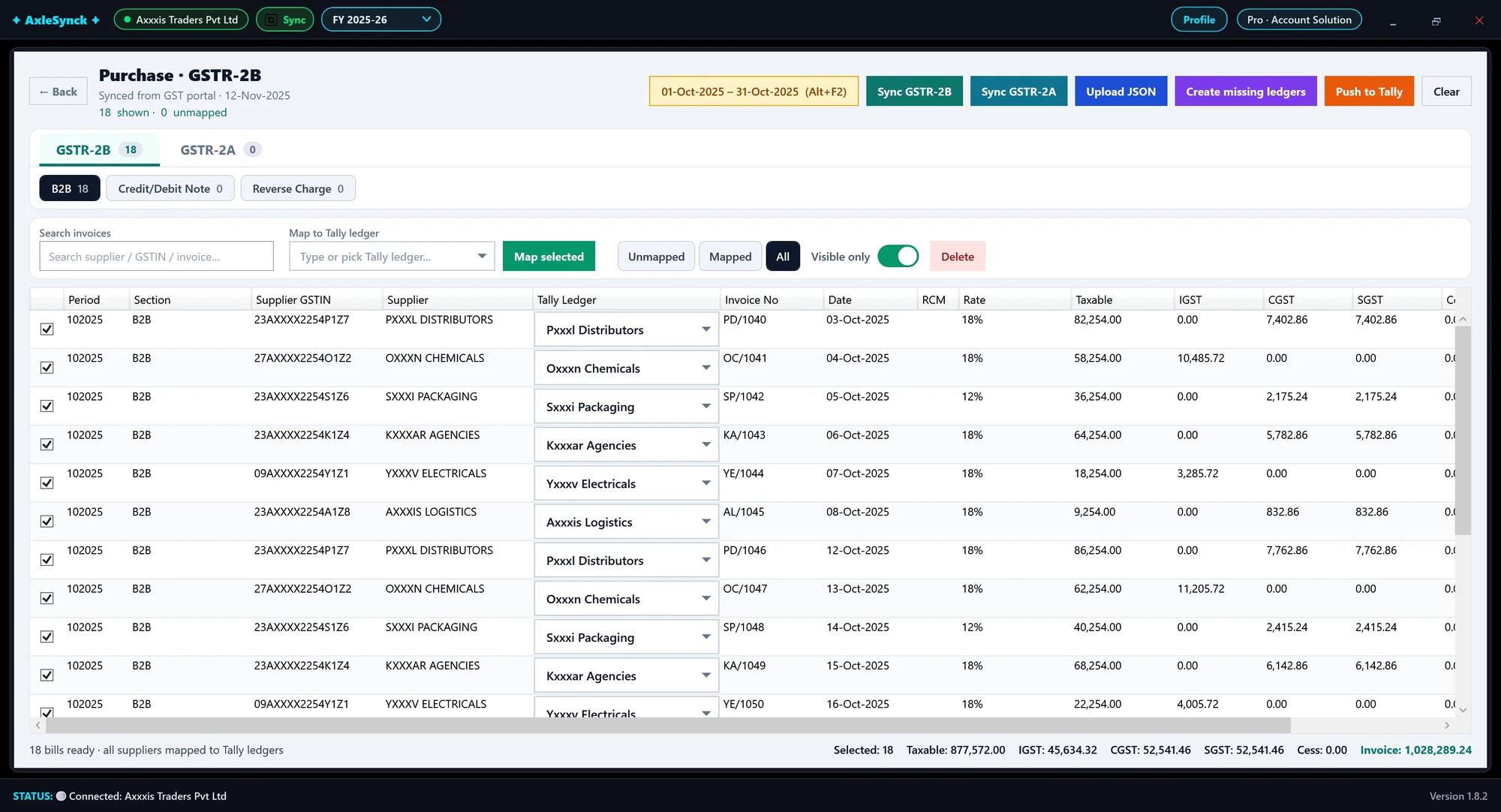
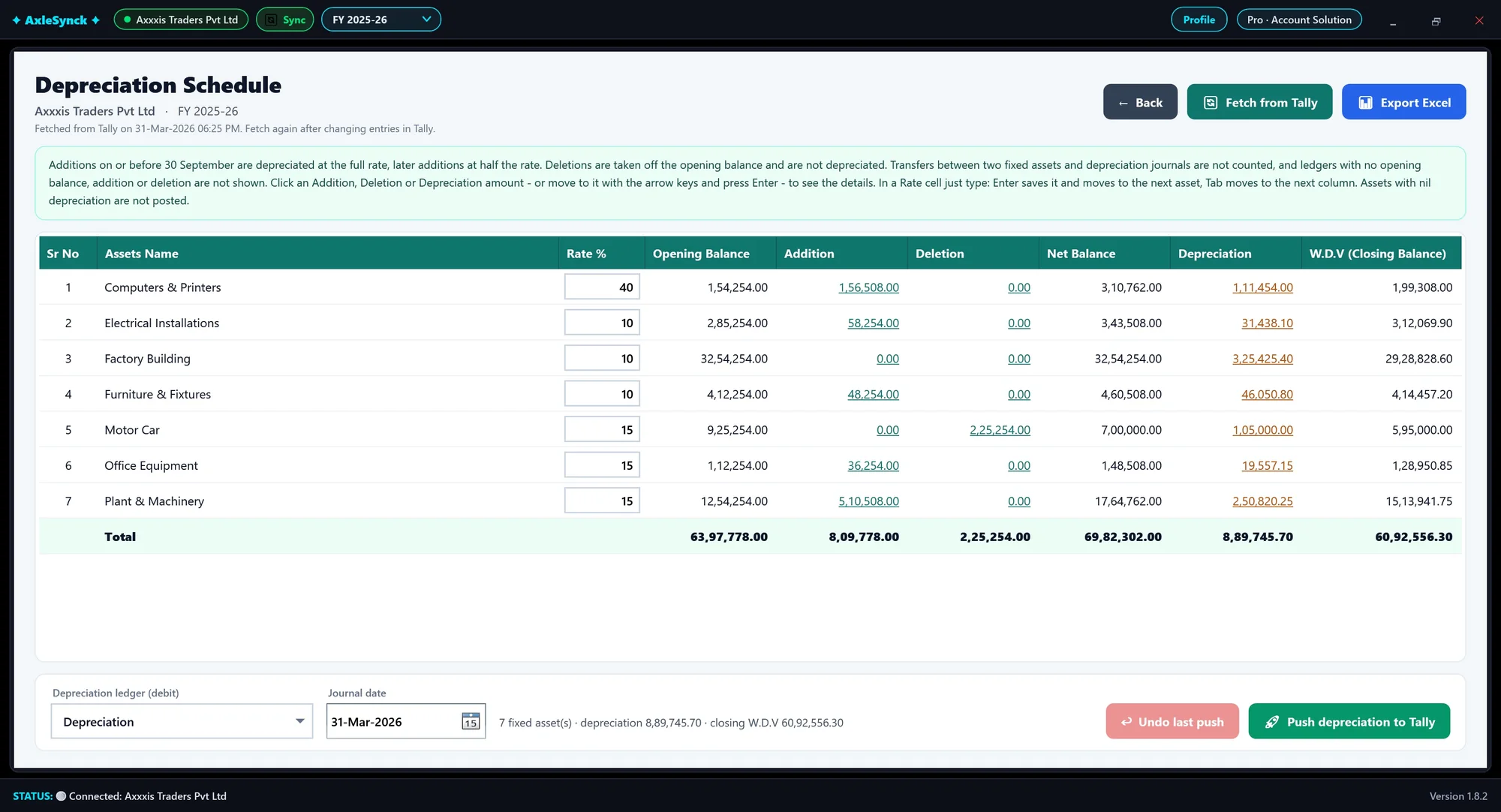
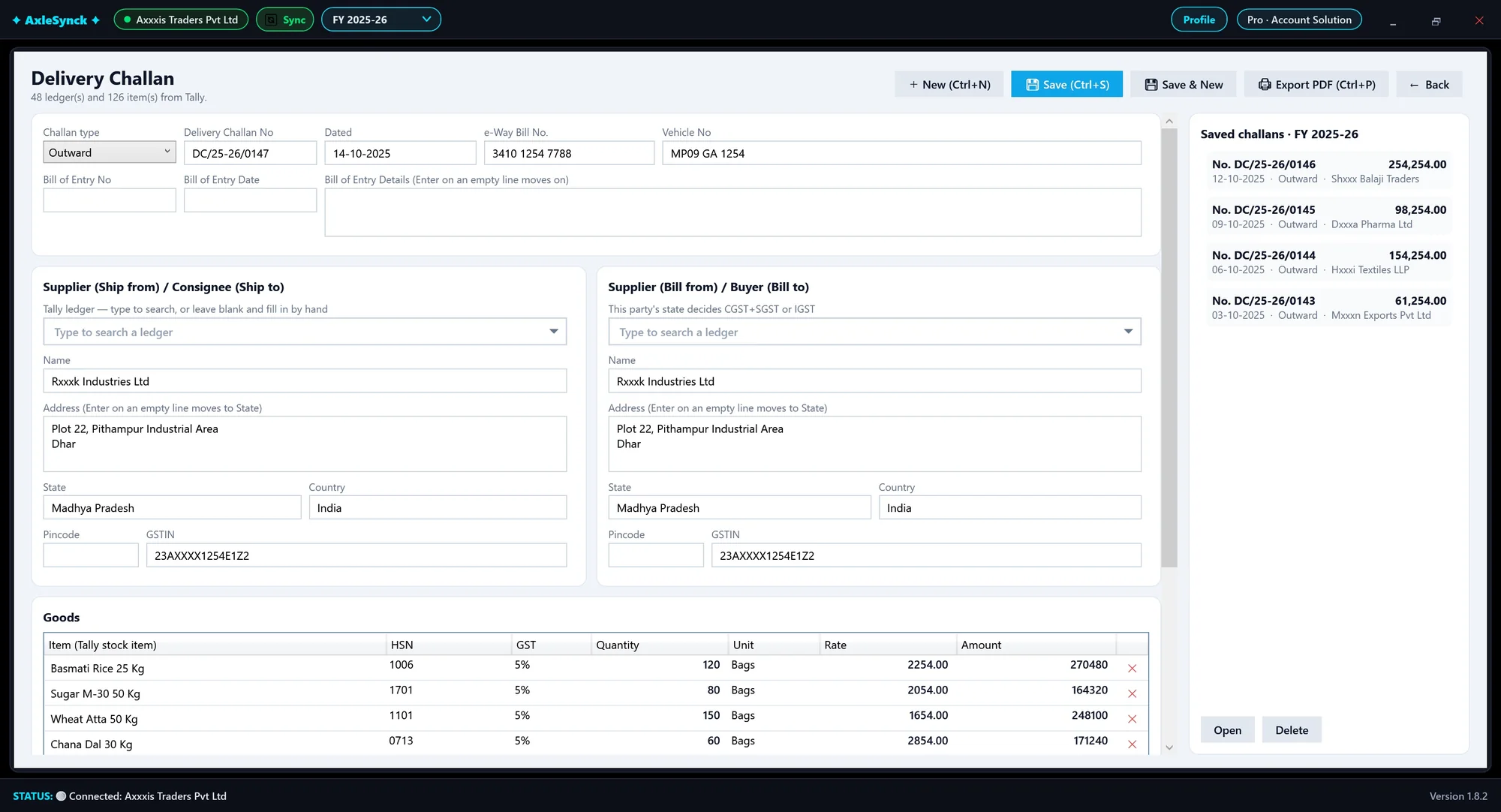
Real AxleSynck screens with sample data - names like "Axxxis Traders" are made up. Click a screen to see it full size.
Everything you do in Tally, done faster
Built for accountants and CA offices that post bank entries and file GST every month.
Bank statement to Tally
PDF, Excel and CSV statements are read as printed, with no template to build.
- Every row checked against the running balance
- Filter by narration, amount range, voucher type
- Undo a whole push if something is wrong
GST reconciliation
Your books against GSTR-1, GSTR-3B, GSTR-2B and GSTR-2A, down to the invoice.
- Sync returns straight from the GST portal
- Cash and credit ledger, challan history
- Creditors over 180 days, GST summary in Excel
Any bank, read on your PC
One reader for every bank: it finds the table in the file itself, so a new bank or a changed layout needs no update. Nothing leaves your computer.
- Many scanned PDFs too
- Right-click a row to correct it; the layout is remembered
- Each statement carries on from the last one's closing
It remembers your ledgers
Every ledger you map is learned, and so are the bank entries already in Tally. The next statement comes with its ledgers suggested, ready to accept, so a month that took hours takes minutes.
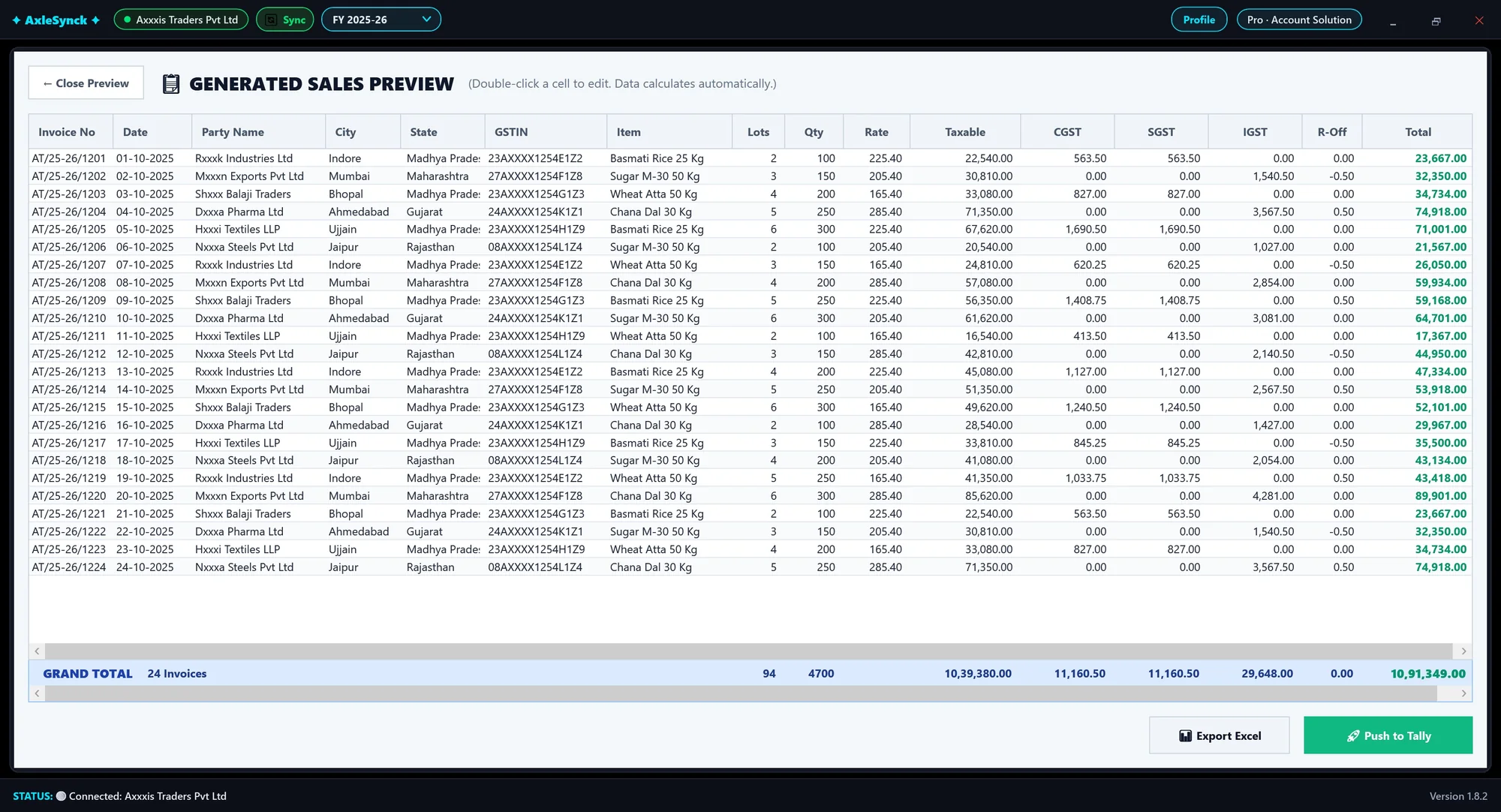
Sales entry from Excel
Fill the Excel template, upload it and push every invoice to Tally in one go.
- Several items per invoice, one row per item
- GST worked out from your Tally items and locked
- Every problem listed by row before upload
Works like Tally, on your PC
Keyboard-first screens with familiar shortcuts, and PDF tools to unlock and merge statements. Your books stay on your computer.
TDS reconciliation
Form 26AS and the new Form 168, synced from the Income Tax portal and matched with your TDS ledger in Tally.
- Party wise, all entries, section filter
- Short or missing TDS at a glance
- Differences posted to Tally, Excel export
Set it up your way
Settings for how your office works: open exports or just save them, a default export folder and a company heading on Excel.
- Start page, financial year and full screen
- Tally on this PC, your network or on cloud
- Ask before every push to Tally, or not
Safe and recoverable
Your work is protected, and a bad day is easy to undo.
- Automatic daily or weekly backup
- Undo any Tally push, roll back an update
- Lost your key? Get it by email in a minute
Purchase entry
GSTR-2B and 2A bills into Tally with each supplier mapped by GSTIN - and your own bills through Manual Entry.
- Paste bills straight from Excel
- Party ledger found from the GSTIN
- Accounting or Inventory mode, with undo
Tally on cloud
Tally on a cloud computer works like Tally on your PC, through the free AxleSynck Connector.
- A cloud computer or any Remote Desktop server
- No VPN, no ports to open
- Encrypted end to end
Ledger match, depreciation, challans
A party's statement matched with its Tally ledger, the depreciation schedule worked out from your fixed assets, and delivery challans from Tally's own parties and items.
AxleSynck works with Tally on cloud
Tally on a cloud computer or any Remote Desktop server - no VPN, no ports to open.
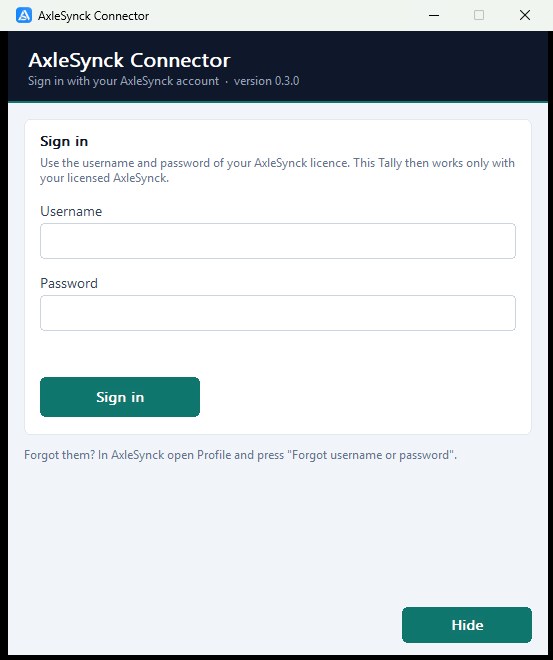
A small free program on the cloud computer links your cloud Tally to AxleSynck
Open connect.axlesynck.in in the cloud computer's web browser, download the AxleSynck Connector and sign in with your AxleSynck username and password. Then pick that computer once in AxleSynck's Settings - nothing to copy - and every screen works with your cloud Tally: bank, GST, TDS, sales and purchase.
- No VPN, no open ports on your PC or on the cloud computer
- Encrypted end to end: our relay passes your data on without storing it
- Your choice: let AxleSynck post entries, or keep it to reading reports
- Only your licensed AxleSynck can use it: the connector checks your licence every day
Simple yearly plans
Each licence is valid for one year.
We are launching AxleSynck. AxleSynck Standard ₹2,999 a year (40% off ₹4,999) and AxleSynck Pro ₹7,499 a year (50% off ₹14,999). Enter code AXLESYNCK499 at checkout for an extra ₹499 off Pro.
AxleSynck Standard
For bank entries
40% OFF- Bank statement to Tally
- Push history and undo
- PDF tools (unlock and merge)
- GST reconciliation
- TDS reconciliation
- Purchase, sales and other modules
AxleSynck Pro
Every module
50% OFF- Everything in AxleSynck Standard
- GST reconciliation (GSTR-1, 3B, 2B, 2A)
- TDS reconciliation (Form 26AS / 168)
- Purchase (GSTR-2B) and sales entry
- Ledger match
- Depreciation and delivery challan
Before you buy
AxleSynck Standard vs AxleSynck Pro
Standard does bank entries only. Pro does everything: GST, TDS, purchase, sales and more, for ₹4,500 more a year. Most firms choose Pro.
| Standard | ProRECOMMENDED | |
|---|---|---|
| Bank statement to Tally (PDF, Excel, scanned) | ✓ | ✓ |
| Ledger suggestions that learn | ✓ | ✓ |
| Push history, undo and PDF tools | ✓ | ✓ |
| GST reconciliation (GSTR-1, 3B, 2B, 2A) | ✕ | ✓ |
| GST Payable with set-off and Rule 86B | ✕ | ✓ |
| TDS reconciliation (Form 26AS / 168) | ✕ | ✓ |
| TDS Working and TDS Payable | ✕ | ✓ |
| Purchase (GSTR-2B) and sales entry to Tally | ✕ | ✓ |
| Ledger match with party statements | ✕ | ✓ |
| Depreciation and delivery challan | ✕ | ✓ |
| Price per year | ₹2,999 | ₹7,499 |
🎉 With code AXLESYNCK499 at checkout, Pro is just ₹7,000.
No thanks, continue with Standard · ₹2,999Checkout
AxleSynck Pro · 1 year licence
You pay securely on Razorpay (UPI, cards, net banking). Your licence key is emailed within 24 hours.
Prices are for one licence for one year, with no automatic renewal. Pay securely with Razorpay (UPI, cards, net banking). Your licence key is emailed within 24 hours. See the Refund & Cancellation Policy and Terms. Questions? support@axlesynck.in
Try AxleSynck free for 1 day
Start it inside AxleSynck: open Profile > Get started > Start free trial and enter the code we email you. Every module is open, with limits: 10 Tally entries per module, sample Excel files, one GST month and five TDS parties. Need help? Chat with us on WhatsApp.
Up and running in three steps
No server to set up. AxleSynck talks to Tally on the same PC, on another PC of your office, or on cloud through the free AxleSynck Connector.
Install
Get AxleSynck free from the Microsoft Store and click Get. It installs by itself.
Try free or activate
Open Profile: start the free 1-day trial, or activate this PC with your licence key.
Open Tally and start
Keep Tally open with your company loaded, pick a module and go.
Requirements: Windows 10 or 11 (64-bit) and a compatible Tally installation. Tally on cloud also needs a web browser on the cloud computer - see Tally on cloud.
Questions accountants ask
Is it AxleSynck, Axle Sync or Excel Sync?
The name is AxleSynck, spelt A-X-L-E-S-Y-N-C-K, and in Hindi एक्सल सिंक. Said out loud it sounds like "Excel Sync" or "Axle Sync", so people type it many ways after hearing it: AxleSync, Axle Sync, AxlSync, AxelSync, Axel Sync, AxleSink, AxlSink, AxlSinc, AxleSinc, AxlySinc, ExlSync, ExlSinc, ExelSync, ExelSink, Excel Sync, ExcelSynck, AkselSync or AxalSync. They all mean this software for Tally, and the website is axlesynck.in.
Can AxleSynck post an Excel bank statement to Tally?
Yes. Drop a PDF, Excel or CSV statement from any bank - SBI, HDFC, ICICI, Axis, Kotak or any other. It is read on your own PC with no bank to pick, and many scanned PDFs are read too. Every row is checked against the running balance and then posted to Tally in one click.
Which GST returns does it match with my Tally books?
GSTR-1, GSTR-3B, GSTR-2B and GSTR-2A, synced from the GST portal and matched with your books bill by bill. Missing bills, amount differences and ITC at risk show up before you file.
Does it do TDS reconciliation with Form 26AS?
Yes. AxleSynck brings Form 26AS and the new Form 168 from the Income Tax portal and matches them with your Tally TDS ledger, party by party and section by section.
Does AxleSynck work with Tally on cloud?
Yes - with Tally on a cloud computer or any Remote Desktop server. Open connect.axlesynck.in on the cloud computer, download the free AxleSynck Connector and pair it once with AxleSynck on your PC. No VPN and no ports to open, and everything in between is encrypted.
Can I enter a sales invoice with several items from Excel?
Yes. In the Manual Sales template each item is one row, and rows with the same invoice number become one invoice in Tally with all its items. GST is worked out from your Tally stock items, and every problem is listed by row before anything is posted.
Can I paste my purchase bills from Excel?
Yes. Purchase > Manual Entry takes a block pasted from Excel, or its template, in Accounting or Inventory mode. The party ledger is found from the GSTIN, and the bills are pushed to Tally with undo.
Is there a free trial?
Yes, for 1 day, and you start it yourself inside AxleSynck: open Profile > Get started > Start free trial, fill in your details and enter the 6-digit code we email you. Every module is open, with limits (10 Tally entries per module, sample Excel files, one GST month, five TDS parties), once per PC. Stuck? Message us on WhatsApp.
How much does AxleSynck cost?
AxleSynck Standard is ₹2,999 a year (regular ₹4,999) and AxleSynck Pro is ₹7,499 a year (regular ₹14,999) at the launch prices. Promo code AXLESYNCK499 takes a further ₹499 off AxleSynck Pro. One licence covers one PC for one year, with no automatic renewal. Pay with UPI, cards or net banking through Razorpay; your licence key is emailed within 24 hours. See plans.
Where is my accounting data stored?
On your own computer, in AxleSynck's data folder. Your Tally data, bank statements, GST and TDS data are processed locally and are not sent to us. Automatic backup can go to a folder you choose, such as Google Drive or OneDrive. Read the privacy policy.
Which Tally and Windows versions does it support?
AxleSynck runs on Windows 10 and Windows 11 and works with Tally on your PC, your office network, or a cloud computer through the free AxleSynck Connector. Keep Tally open with the company loaded while you work.
How do I post a bank statement to Tally?
Open Bank Statement, choose the party, bank and the PDF, Excel or CSV file, check the rows against the running balance, map the ledgers and click Push to Tally. Any bank's statement is read as printed, with no bank template to set up. Full steps are in the bank import tutorial.
Who is AxleSynck for?
For Indian accountants, CA firms and business owners who keep their books in Tally and want to stop typing bank entries, checking GST returns by hand and matching TDS party by party. It is made by Account Solution in Indore, Madhya Pradesh.
How do I get help?
Email support@axlesynck.in, message us on WhatsApp, or send an enquiry. We are in Indore, Madhya Pradesh, India.
We are here to help
Questions, a demo, or help with your licence.
support@axlesynck.in
Address
Indore, Madhya Pradesh
Chat with us
Enquiry form
Send us your details
Ready to save hours every month?
Download AxleSynck and post your next bank statement to Tally in minutes.
Download for Windows